
Tabs
Last updated on
May 24, 2023
Learn how to change the app settings and set your preferences in Illustrator on the iPad.
Do you customize your app settings every time you open Illustrator on your iPad? You can control the app settings and customize your preferences for a seamless experience.
Do one of the following:
- Tap
 in the upper-right corner of the Home screen.
 - Tap
 in the upper-right corner of the document workspace and then tap App settings.
The App settings dialog appears with various tabs in which you can change the app settings or set your preferences.
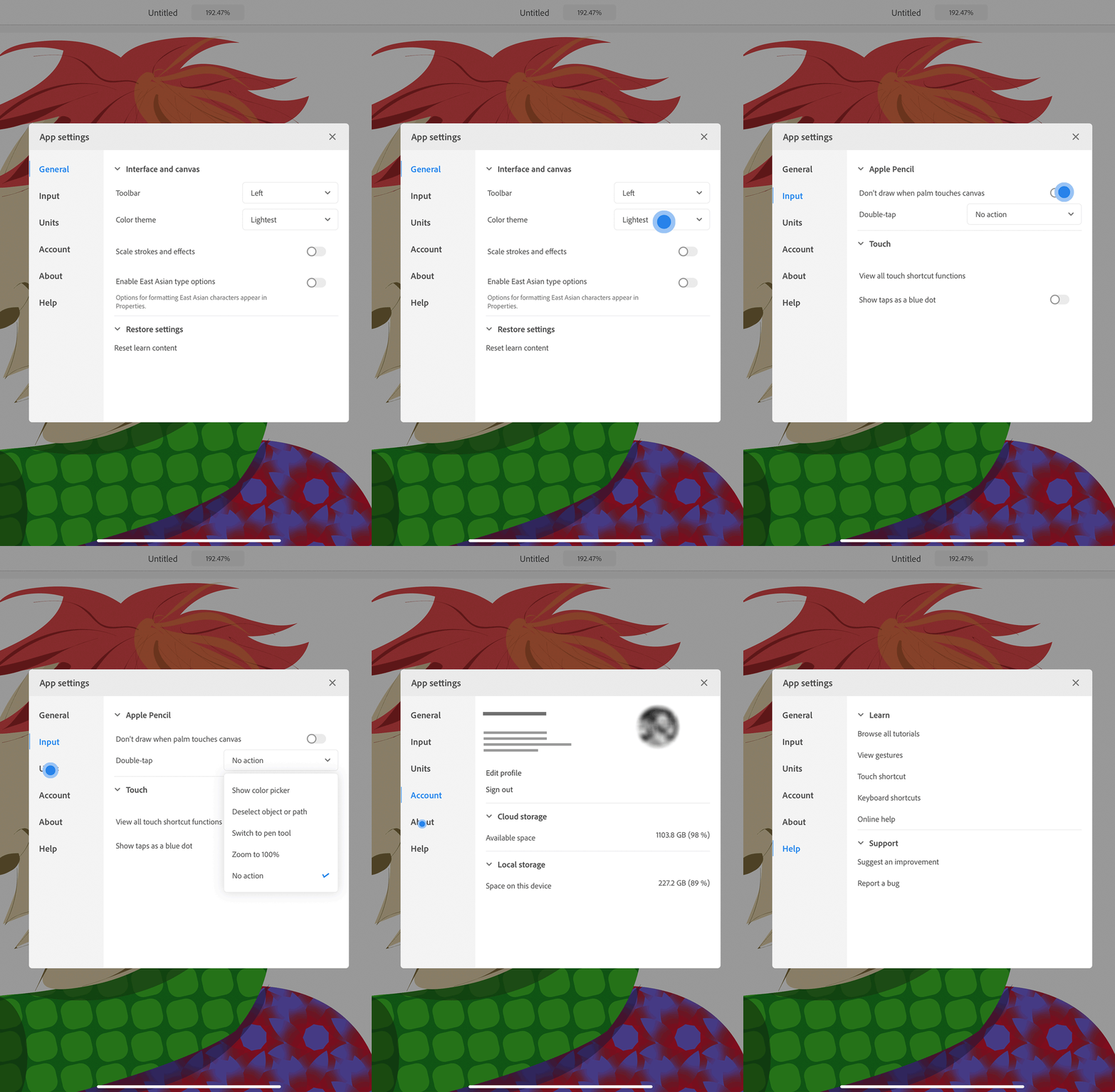
View the app settings.
|
|
Settings and Options |
|---|---|
|
General |
Interface and canvas:
Restore settings:
|
|
Input |
Apple Pencil:
Touch:
|
|
Units |
|
|
Account |
|
|
About |
Version x.x.x: Displays Illustrator on the iPad version. Follow and share:
Legal:
|
|
Help |
Learn
Support:
Tap to open Illustrator UserVoice page where you can suggest improvements and report bugs. |
See also: Set preferences in Illustrator on the desktop.
Got a question or an idea?

If you have a question to ask or an idea to share, come and participate in Adobe Illustrator Community. We'd love to hear from you.
